Tuesday, January 3, 2017

TOP 5 Easy New Year's Resolutions for Educators


"Out with the old; in with the new" is honestly NOT a phrase that should completely dictate our 2017 planning as educators. Research shows that much of the "old" that we are doing is good for kids, and there is no reason to abandon EVERY educational practice in exchange for the newest trends.

However, the start of a new calendar year, and a new academic semester for most, does encourage thoughtful reflection on the first 18 weeks of school. Along with that, it is an ideal time to infuse a few new practices for increasing the success of your classroom or campus. Here are my Top 5 recommended simple practices to incorporate immediately in 2017.

#5 - Connect your Classroom (Virtual Field trips or Zoom video conferences)

Although Virtual Field Trips are far from "new," the new year is a perfect reminder of their availability, simplicity, and educational power.  Whether free or paid, interactive or not, synchronous or pre-recorded, a VFT can be a great entry point into a new unit of study, a review of key content, exposure to application of concepts in the real world, or even a classroom reward for work well done.  As a reaffirmation to this time-honored practice, check out Matt Miller's (STI 2017 Keynote) latest post featuring 10 great virtual field trips for 2017.

New to ESU 8 educators this school year is the availability of free Zoom Pro licenses (contact Molly to get set up). Whether it be to share your screen for tech support purposes, collaborate with a colleague over distance, or simply launch an interview with an expert, Zoom is one of the easiest, most reliable tools currently available. And Zoom's newest features include some really powerful educational tools, including a green screen feature. To learn more about connecting your classroom globally, visit this recent ESU 8 presentation. Set a professional goal to launch at least one global collaboration experience for your students in the early months of 2017, and don't hesitate to reach out to ESU 8 for support. 

#4 - Coding for Kids (Swift Playgrounds and drone robotics activities)

One unfortunate byproduct of the Hour of Code initiative is that schools restrict coding opportunities for students to that one week in December. Coding should be infused year-round for all ages and this new year is prime time to work in some coding activities in your classroom. 

If you have access to iPads for students I would highly encourage starting with Swift Playgrounds. Apple announced their Everyone Can Code initiative this school year, consisting mainly of the new (and free!) Swift Playgrounds app (for newer iPads) and accompanying free Learn to Code Teacher's Guides and free video lessons on iTunes U.  To be perfectly honest, teachers don't need to know a single thing about coding and still successfully lead the lessons that are laid out in these resources. 

To read more about opportunities for exposing kids to the power of coding, visit this blog post from Hour of Code week 2016 at ESU 8. Also, contact us at ESU 8 to learn more about checking out Sphero SPRKs and/or Parrot mini drones to use for computer science activities in your school. 

#3 - Online discussions (Canvas LMS or blogs)

Promoting more authentic dialogue for students has never been easier! If your classroom already has access to a Learning Management System (such as Canvas) you most certainly should take fuller advantage of the built-in features, one of the most powerful being discussions. While an obvious discussion prompt would be a question that all are expected to answer, there are many options for structuring it to promote additional skill development.  (Delayed response, group moderated discussions, private student-teacher discussions, for example, are all possible with Canvas LMS.) Consider using an online discussion for your next: bell-ringer, scavenger hunt, back channel, daily skills practice, journalling activity, vocabulary practice, anticipatory set, brainstorming session, gallery showcase, or exit ticket.

Using a blog for authentic student dialogue is simple to get started as well. If your school is a Google Apps for Education school already, then every account already has access to their own Blogger space. Start a class blog and add your students as co-authors. Set up a calendar so that each student takes his/her turn as being the "daily blogger" and documenting each day's learning objective and activities. Alternatively, each student could begin the 2017 semester with their own individual blog. On it, they could post their best learning artifacts (portfolio), weekly progress updates, or personal reflections on their learning journey. Regardless, do not neglect to emphasize and model the powerful practice of commenting to make student discussion even deeper. 

Coming Soon from ESU 8: a Wednesday Webinar (and Winter Workshop session) to help you get more from Canvas. 

#2 - Breakout EDU

Coming back to school following a break is a perfect time to run a Breakout EDU in your school or classroom.  The team-building and critical thinking benefits are vast; not to mention the opportunities to infuse current curriculum. If you haven't yet tried a Breakout EDU, I would recommend beginning with one of the featured games on breakoutedu.com. However, don't be afraid to stop there! Everyday there are more and more quality games being added to the published and sandbox games areas of the site. Consider searching for games aligned with your next unit or topic of study. 

Don't have a Breakout EDU kit? Don't hesitate to reach out to us at ESU 8, as we have several kits available for checkout in the Media Center. In addition, multiple members of the professional development team are willing to come out to your classroom and help you administer your first Breakout EDU experience. 

Yet another option is to try one of the newest digital breakout games. These require no physical locks or kits of any kind, as they can be completely solved on any web-enabled device. Beware, however, as there are no answer keys to these deductive puzzles!

#1 - Apple Teacher Program

In my opinion, there is no current, better way for personalized professional growth, than the Apple Teacher Program.  Simply register for the program with your Apple ID, download the free Starter Guides, and take the quizzes at your own time and place. Learning at your own pace is certainly appealing, as is the ability to retake quizzes over and over until you have mastered the content. Even if you already feel competent in your Mac or iPad skills, you are certain to learn new ideas for the classroom application of many built-in tools and apps. Read more about the Apple Teacher Program in this blog post from Edutopia.

If you don't teach in an Apple environment, you might consider Google's similar certification program. While the quizzes do have a fee associated with them in the Google Certified Educator program, you can still access the study materials and learn from them for free.

Whatever path you choose, be sure to celebrate your accomplishments through the ESU 8 Certification Challenge. Submit your certification(s) achieved and enter your name in a drawing for a free technology integration day led by the ESU 8 Team.

http://www.esu8.org/edtech-certification-challenge/


So, there you have it... my Top 5 picks for educators to amplify their teaching in 2017.  Choose one right now and commit to it as your professional New Year's resolution. Better yet, select more than one and work on progress towards those goals little by little. I guarantee you'll add new life to your classroom environment, and even without ditching ALL your past practices.  As always, remember your ESU 8 partners are ready to work alongside you to help you achieve these goals and more.

Happy 2017 to all educators, near and far!

~Katie Morrow, ESU 8

Tuesday, October 11, 2016

Capture Your Journey: Digital Storytelling for Schools

LEARNING IS A JOURNEY, AND IT IS OUR RESPONSIBILITY TO SHARE THAT STORY. CAPTURE HIGH-QUALITY MEDIA WITH LOW-COST TOOLS. EXPLORE TOOLS AND TECHNIQUES THAT ANY TEACHER CAN USE ANY DAY TO CAPTURE BETTER IMAGES, MAKE MORE POWERFUL MEDIA, AND REACH MORE AUDIENCES. PHOTOGRAPHY, AUDIO RECORDING, VIDEO CAPTURE, EDITING, AND PUBLISHING TIPS WILL BE DEMONSTRATED, ALL WITH DEVICES READILY AVAILABLE IN MOST CLASSROOMS.

(from STI 2016)


Everyone Can Code!

Everyone Can Code!
an ESU 8 Wednesday Webinar from Katie Morrow


Everyone Can Code is an initiative recently launched by Apple to make coding with the Swift programming language even more accessible to all. Learn about Swift Playgrounds, a free app designed for middle schoolers on up, accompanying Teacher’s Guide, and related resources to give even novices more opportunities to reach students interested in coding. 

View the webinar here

and check out the Links and Resources below:

Everyone Can Code (and Swift Playgrounds)
Wednesday Webinar 10-5-16


Swift Playgrounds app
*Requires iOS 10.0 or later
Designed for Middle School Students

Swift Playgrounds Teacher Guide

App Development with Swift
Designed for High School or College Students

App Development with Swift Teacher Guide

Additional Resources

Coding STEM kits available for check out through the ESU 8 Media Center

Tickle app (free, but requires newer iPad)

Ozobot for pre-coders

Coding for Kids blog post by Katie Morrow from last year

29989380921_e5c99b1221_z.jpg

Impact Your Audience: Presentations that rock!

Are students disengaged with your traditional presentation design? Are staff members turned off by your presentation delivery? Find out ways to improve your next presentation, whether for professional learning experiences or everyday classroom instruction. Explore concepts in layout & design, strategies for engaging your audience, and presentation techniques used by some of the world’s best speakers. Make your next presentation rock!

Resources to accompany “Impact Your Audience: Presentations that rock!”
Curated by Katie Morrow


Books


Free for iBooks


Presentations About Presentations!


Recommended Media Sources


Additional Resources


Tools for Audience Interaction

Wednesday, August 24, 2016

Exciting updates with Challenge Based Learning


Whether you are familiar with Challenge Based Learning (CBL) or not, the time is ripe for newly updated resources surrounding this student-centered learning framework. 

Our students are eager for meaningful, applicable learning experiences and CBL provides just the right amount of scaffolding to impact any classroom or campus. 

Begin by downloading a brand new users guide, available for free in the iBooks Store.  

This resource is jam-packed with insight. From the history and foundational thinking of CBL, to a simplified 3 stage process, to connections other pedagogical approaches- each page adds exciting knowledge to any educator's expertise. 

Also, be sure to explore the newly updated CBL website, shared by Digital Promise at http://cbl.digitalpromise.org. In addition to the rich resources here, registration is currently open for a  global challenge based on the United Nations Sustainable Development Goals. 

What an exciting time to be an educator! Join the hundreds of thousands of teachers and schools who have already seen the impact of CBL on their students and communities.  Join the #CBLWorld movement today.


Monday, April 25, 2016

NETA 2016

Another NETA Conference is officially in the books, but as always, the learning doesn't stop at the Century Link Center.  Here is a quick collection of how my time was spent learning this year at NETA 2016. 

I presented three sessions this year and have linked the slides and resources for each. 

So, You Want to Publish a Book? (NETA 2016)

Learn about the process of publishing on the iBooks Store from start to finish including topic and project ideas for both teachers and students, content development in iBooks Author, and the submission and approval process from iTunes. Whether for classroom use or personal professional use, anyone has the ability to become a published author on this powerful platform!


If you thought Keynote was simply used to create slideshows, you will be amazed! See creative ideas for alternative uses of Apple's Keynote app for either Mac or iOS. Coding, animation, holograms and more... and all experiences are easy enough for beginning users. Learn and apply innovative ideas to do more with something you already have access to: Apple's Keynote.


GameShowification (NETA Ignite Talk 2016)

Learn about lessons for education gained from my personal experiences playing a TV Game Show -  Family Feud! Google slides with notes: https://goo.gl/R7aJRU 


As always, the NETA Keynotes were first-rate.  This year they featured "NebEdTalks" - shorter style Nebraska Education "TED Talks" - from 4 different presenters.  Leading off was Bob Dillon, Director of BrightBytes Institute who reminded us to slow down, notice and appreciate more.

Jennie Mageira, however, encouraged us to get motivated to let go and take risks with her talk centered around "Courageous Edventures."  
Day 2 Keynotes included Rafranz Davis on Diversity in Education and Nebraska native, Tony Vincent, who encouraged us to "Reset the Presets." 


For me professionally, there were too many valuable sessions to even begin to list. However I did see many common themes. Over and over again, we were reminded in the power of failure- both for our learners and for ourselves professionally. "Play" and gamification, both in teaching and in PD were repeated frequently. Google Cardboard and the MakerSpace/Maker movement were also a common interest for participants. Blended Learning continues to be an important topic for schools as well, and NETA provided numerous sessions and resources for it.

Additional personal highlights for me came from secondary experiences related to NETA. I participated in a BreakoutEDU session and thoroughly enjoyed the collaborative challenge of breaking out of Dr. Johnson's Lab. The educational opportunities that exist with this concept excite me for schools. Learn more at breakoutedu.com.

NETA also sponsored its first ever 5K fun run/walk. We woke up early on Friday morning to take a short run across the bridge into Iowa with fellow NETA participants. Again, sometimes it is the peripheral experiences that provide the richest learning opportunities.


To follow some of the many tweets from #NETA16, check out this Twitter archive - rich with links and commentary.


Wednesday, April 13, 2016

Power of Public Sharing

Lynch, Nebraska, population 236 (2013 census) to me has always been the epitome of rural community pride.  It is home to thriving businesses, genuine people, and a great getaway for anyone desiring a break from the beaten path.

Lynch Public School continues to try and push the envelope with technology amidst the realities of declining population, waning financial support, and public opinion encouraging consolidation or closure.

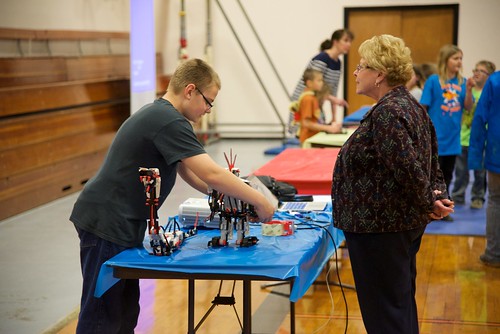
During the current school year Lynch Public School set a goal to host a Technology Fair with the intent of showcasing technology usage across the K-12 school. Efforts began early, and by partnering with ESU 8, teachers were provided related training and ongoing support. Teachers chose a variety of projects and tech skills to implement in their classrooms and subject areas. Plans were shared across the staff so that duplicate ideas were avoided and a wide variety of exemplars could be showcased.

For the Tech Fair each teacher hosted a “booth.” All students were encouraged to attend and demonstrate technology skills they had gained from their classroom experiences. The entire community was invited to attend, and like any good open house, refreshments were served. :-)


On their own initiative the staff worked together to create a plan for the delivery of the experience, open to the public. They set up projector screens back to back in the middle of the gym and positioned additional tables around the outside edges of the gym. Every available projector from a classroom was moved to a table station. Some stations required speakers and/or headphones, while others just required iPads or laptops to demonstrate. 

2016_03 Lynch Tech Fair
Click the above image to view the Flickr album of photos from the event.
Some of the high level student work that was shared included:
  • iMovies of classroom activities (“A Day in the Life”)
  • Instructional videos (PE and Industrial Tech skills)
  • Augmented Reality projects (“About Me” and science…)
  • Robotics
  • iXL Math
  • Kahoot online quiz games
  • Digital books created with iBooks Author (World War II)
  • Digital books created on iPad with Book Creator app (Weather Instruments)
  • 20% Project Presentations (student-directed scientific research projects)
  • Green screen videos (music videos and more!)
  • Online portfolios (Art portfolios built with Smore)
  • SMART Board activities in English Language Arts
  • Learning journals with the SeeSaw app
  • Sketchup (3D design) 
The event was well attended. Many parents, grandparents, and additional family members were treated to a more in-depth personal exposure to each student’s learning experiences with technology. Another positive outcome was the visitors who were not necessarily relatives of the students, but simply interested community patrons. To be able to demonstrate the value of tax payers’ money and the purposeful impact the school is making for youth is an absolute win-win for all. 


I have often said that it is our personal responsibility as educators to promote the positive things that are happening in our classrooms.  Lynch Public School took on this task and more with their collective efforts around the Tech Fair.  They proved once again that no matter your school’s size, you can be an example to others— an example that I hope to see others following in the near future. Whether through online spaces, in the media, or simply inviting the community in for an experience like a Technology Fair, we all can be advocates for technology-enhanced education through the power of public sharing.