2nd and 3rd graders in Ms. Mather's Science class at Lynch Public School have been becoming weather experts. They decided to show what they have learned about scientific instruments by creating eBooks with one of my favorite apps: Book Creator. Here is a simple overview of their successful iPad learning adventure as well as easy extension ideas for additional application.
Photographing the weather while staying warm!
Building Background Knowledge
Ms. Mather and her class learned about Weather. Some great digital resources include "Weather" from World Book Kids and several videos from Learn 360 - both available through your ESU 8 Media Center access.
Ms. Mather decided that "weather instruments" would be a good focus and structure for the students' digital project.
Each student created a paper book detailed 8 scientific instruments used to study weather. Each page included the instrument name, picture, and student-created sentence.
Book Creator Basics
I shared an example of a student-authored Book Creator book, "A Dream Come True" (by Drew and Claire Morrow)
Then I showed them how to get started with a new Book Creator project and we discussed opportunities for creative content to go into their pages.
Weather Examples in iBooks
Next we looked at a couple of published examples by students in the iBooks Store including:
Students quickly and easily navigated to the Book Creator app on their iPads and got started. Even with the free version of the app, students can completely author and publish one entire book. Plans to upgrade to the $4.99 paid version were quickly made and easily jus
tified for future projects.
Each page followed a pattern, and every page had a plan (in the students' paper books) and so students could concentrate on the creative side of publishing, maximizing their technology time.
For each page's images, students could choose whether to draw the weather instrument, take a photo using their iPad's camera, or find a photograph of the instrument online. Students were encouraged to use photosforclass.com for copyright-friendly images for their books.
iPads allowed for differentiation. Some students were encouraged to add in a page about each weather instrument with either a photo or video of the student using it.
All students were encouraged to record all of their book's sentences as audio recordings on each page. We discussed how valuable this would be for someone who is blind, who doesn't yet know how to read, or even for guests at an upcoming technology fair.
Students excited to discover scientific instruments emojis!
Decisions for Delivery
Format (individual or group-authored)
Topics (jigsaw ideas, common outline, uniform topics)
Required Components (text + audio recordings of all text, photos or drawings, video)
Title (and covers)
Extension Options
Along with the students' study of weather instruments, this project would work well with creating a class weather forecast (using iMovie or DoInk and a green screen).
A global learning opportunity would be to ask each student to survey and collect data/images of the weather around the world. After analyzing or mapping the results students could explain what they learned in their digital books.
Obviously, any topic could easily be interchanged with "weather" and used for an equally successful project.
Transfer of analog to digital
Don't underestimate the power of publishing to the iBooks Store. Although these students plan to share within their school community and with the guests who come to their Technology Fair, they could also elevate their work to a global audience by leveraging the iBooks Store platform.
The weather kindly cooperated by gently snowing making for some great images for the students' books
What is the weather like in your part of the world? Using Google Earth
Friday, February 12, 2016 was a career exploration day at Madison Public School, and I was lucky to be invited to participate. Every student in grades 9-12 rotated through eight different sessions with professionals sharing about their chosen career path. The day was designed by Karla Kush, Guidance Counselor and Jim Crill, HS Principal, and Madison has done variations of the experience several times in the past. What a great opportunity for students to link purpose for what they are doing in school and discover many different options for professional ambitions!
Guest speakers at Madison Public School's Career Day, February 12, 2016
In each of the 8 rotations, students were tasked with completing a "Career Report" which not only helped guide the discussions, but also helped students make connections to their personal goals.
I began by sharing a brief story of my journey to getting to my current professional role.
Next, I talked about some of my experiences through the SMART Exemplary Educator, Google Certified Teacher, and Apple Distinguished Educator programs, and what leading technology companies today are looking for in future employees. Instead of seeking "clicking skills," software expertise, or even GPA, it is more important to have innovative ideas and the ability to prove yourself as a self-directed learner.
I encouraged students to open their minds to additional opportunities that exist within the fields of educational technology. When I think about all the "jobs" that I have had even as "just a teacher" it is really mind-boggling. In education you can not only be a teacher, but a writer, presenter/speaker, leader/administrator, coach, counselor, media specialist, tutor, curriculum developer, and teach online classes. In the field of technology I have had experiences with web design, coding, network & systems administration, social media, animation, graphic design, and multimedia creation, just to name a few. The possibilities are truly endless, if students are willing to approach the career with an open mindset and be willing to continually keep learning.
And to do so, there is no time better than the present. I concluded by sharing three valuable tools/tips for pursuing any profession or career, even while they are still in high school.
1) Get motivated by TED Talks and see others' inspiring ideas take shape into action. Follow their lead or apply to your own passions.
2) Learn anything, anytime, anywhere with iTunes U. Don't limit yourself to the classes you take or what your teachers know.
3) Be intentional about building a positive digital footprint-- starting right now. Make yourself "google-able" and build a personal brand for yourself that showcases your talents, skills, and interests. Start a blog or build an about.me page.
We had great discussions with high school students about the exciting times we live in and the opportunities for all to follow their dreams. Thank you, Madison Public Schools, for the chance to share my excitement for the field of educational technology with your bright youth!
New Year's Resolutions are definitely an opportunity to refocus, to realign our goals. However, resolutions can often focus on the negative, and even more often elicit results which lack success. Rather than resolutions, consider this year a #oneword for 2016. Choose just one simple, powerful word for the new year to help focus and motivate towards action.
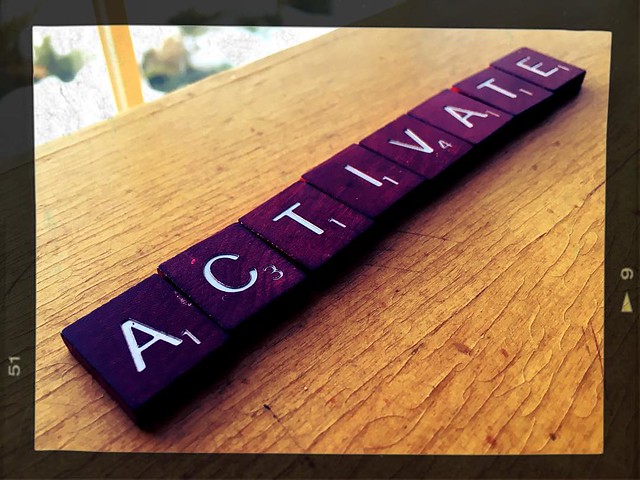
This movement towards action is what motivated me to give it a try. My One Word for 2016 is ACTIVATE. I chose it because it begins with those three powerful letters: act. While the part of speech for your one word is not prescribed, it was important to me that it be an action verb. I enjoy the challenge of lighting fires and inspiring others to do more each and every day. In addition, ACTIVATE would score a Scrabble bonus, which is always a great thing!
Whether you participate personally, professionally, or with your students, take a moment to reflect on your #oneword for a new year. Do something with clarity, purpose, passion, and power. Share your #oneword for #2016 today!
I just recently worked with a staff of teachers on Creating Classroom Content with iBooks Author. Here is the digital handout that I created for the half day session:
But my biggest success with iBooks Author as a teacher has been letting go and encouraging my students to become authors themselves. Whether for a science project, historical interview/biography, digital portfolio, poetry journal, nonfiction or fiction writing, when students are empowered by the high caliber tools available and the possibility of a global audience in the iBooks Store, they rise to the experience.
OR-- just search the iBooks Store for ONeill Public School
:-)
A challenge for us is distribution of books that are NOT published to the iBooks Store. To work around this we found success by adding content to a course to which all students can enroll and then download any books they need.
This works very well for iPad, but being 1:1 school with MacBook Airs my ongoing plea is that books in an iTunes U course can be downloaded from a Mac (like video and pdf materials currently can). iBooks on the Mac has tremendous value in education, too, and not every book is suited for public publishing in the iBooks Store. Other than that, we LOVE that students and teachers have another rich option for producing and sharing media-rich educational content. iBooks Author rocks!
Our year has come to a close, but the lessons learned and memories made need never fade. To re-live the English 7 experiences over and over, be sure to download our class book from the iBooks Store.
To enjoy our class iBook, you will need the free iBooks app (on Mac, iPad, or iPhone). Go to: tinyurl.com/abcsofeng7 OR you can search the iBooks Store for “O’Neill Public School” and find our book. Download with your Apple ID and enjoy!